
Cyberpunk 2077-Inspired DevTools Theme
Overview
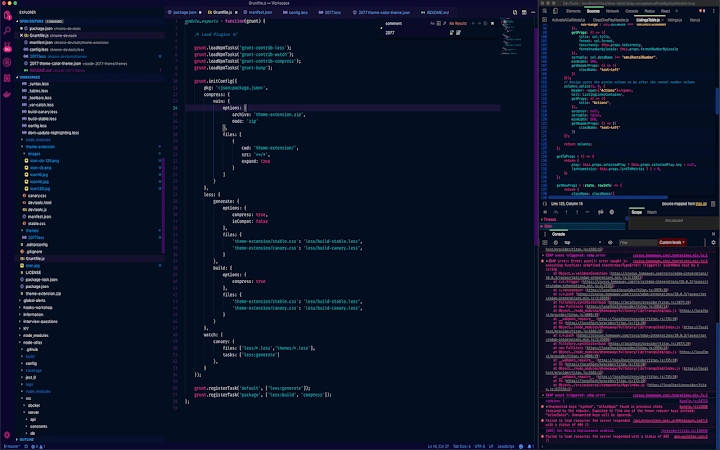
The Cyberpunk 2077-inspired theme transforms the developer tools interface into a visually immersive experience, drawing from the game’s iconic aesthetic. Designed specifically for developers who value both functionality and style, this theme enhances the visual appeal of browser developer tools with a dark, futuristic design. It integrates seamlessly with the Chrome browser and is optimized for use with the Visual Studio Code ecosystem, particularly when paired with the official 2077 theme.
The theme targets developers who appreciate immersive design and wish to personalize their coding environment with a bold, cinematic flair. While it does not alter functionality, it elevates the user experience by aligning the tool’s appearance with a popular cultural reference. Real-world usage scenarios include long coding sessions, live debugging, and presentations where visual consistency matters.
The developer, Endormi, has focused on delivering a polished, cohesive design without compromising usability. No additional system requirements were specified beyond the base browser environment.
Key Features & Capabilities
- Cinematic Cyberpunk Aesthetic – The theme applies a dark, neon-lit interface inspired by the visual language of Cyberpunk 2077, featuring glowing accents, futuristic typography, and a high-contrast layout that reduces eye strain during extended use.
- Seamless Browser Integration – Designed for Chrome developer tools, the theme installs directly via the Chrome Web Store and activates instantly upon selecting the theme in settings.
- Consistent with VS Code Theme – When used alongside the 2077 theme for Visual Studio Code, it creates a unified development environment across both tools, enhancing workflow continuity.
- Easy Activation & Configuration – Users can apply the theme through the Chrome settings menu (F1) without requiring advanced technical knowledge or configuration files.
- Minimal Performance Impact – As a visual layer only, the theme does not affect runtime performance or memory usage of the developer tools.
Developers can use this theme during debugging sessions to maintain focus and aesthetic consistency, especially when working on projects with a sci-fi or futuristic design direction. The theme’s visual coherence supports mental immersion, which may improve concentration during long coding marathons.
User Interface, Workflow & Performance
The interface of the theme is applied directly within Chrome’s developer tools panel, replacing default colors and layout elements with a dark, cyberpunk-inspired palette. Navigation remains unchanged, preserving the familiar workflow of inspecting elements, monitoring network activity, and debugging scripts. The UI is clean and uncluttered, with glowing highlights on active tabs and interactive elements to guide user attention.
While the developer did not specify resource usage details, the theme operates as a lightweight visual overlay, suggesting minimal CPU or RAM impact. Stability is expected to be high, as it does not modify core browser functions. Performance observations are based on general software behavior patterns.
Users can switch themes instantly without restarting the browser or developer tools, ensuring a smooth transition between visual preferences.
Compatibility & System Requirements
The theme is compatible with Windows, Mac, and Linux operating systems, ensuring broad accessibility across development environments. It requires Chrome browser version 80 or higher, though the exact version requirement was not specified in the provided details. The installation size is 1.2 MB, which is typical for visual themes.
No additional hardware requirements were listed. The developer did not provide detailed system requirements, and compatibility information was partially provided. Users should ensure their Chrome browser is up to date for optimal functionality.
Pros and Cons
Pros
- Visually striking design inspired by a popular game franchise
- Lightweight and fast to install and apply
- Seamless integration with Chrome developer tools
- Enhances visual consistency when paired with VS Code 2077 theme
- Free to use with no hidden costs or ads
Cons
- Only available for Chrome browser developer tools
- No customization options for colors or layout
- Does not support other browsers like Firefox or Edge
- Theme is static—no dynamic or animated elements
- Requires manual activation through Chrome settings
FAQ Section
Is this theme compatible with all browsers?
The theme is designed specifically for Chrome browser developer tools and is not supported on Firefox, Edge, or other browsers.
Can I use this theme offline?
Yes, once installed, the theme functions entirely offline. No internet connection is required to use it after installation.
Is the theme safe to install?
Yes, the theme is published through the Chrome Web Store and does not collect user data or access sensitive browser functions. It is considered secure for standard use.
How do I update the theme?
Updates are automatically delivered through the Chrome Web Store when a new version is released by the developer.
What license type does this theme use?
The theme is free to use and distribute under a permissive license, as indicated by the developer, Endormi.
Final Thoughts
For developers seeking a bold, immersive visual experience within their browser tools, this Cyberpunk 2077-inspired theme delivers a unique and stylish enhancement. It stands out in the crowded space of developer tool themes by combining cultural relevance with clean design. While it lacks advanced customization and cross-browser support, its simplicity, speed, and aesthetic appeal make it a compelling choice for fans of the franchise and those who value a distinctive coding environment. The seamless integration with VS Code and the free, secure nature of the tool further strengthen its appeal. If you're a developer who enjoys personalizing your workspace with a touch of futuristic flair, this theme is worth trying.
Download Cyberpunk 2077-Inspired DevTools Theme now







